
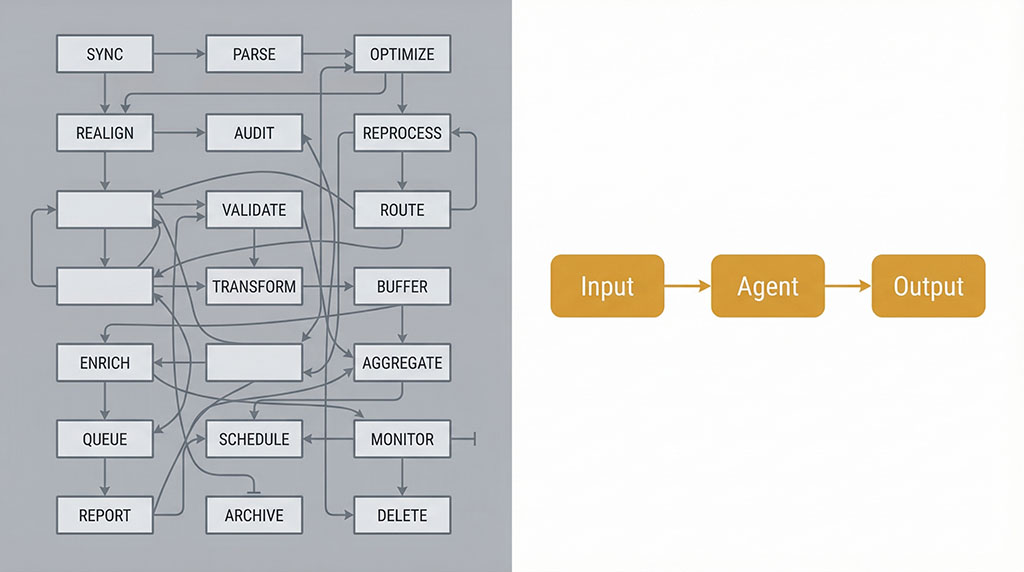
The slide deck came with a diagram.
Boxes connected to boxes. Arrows looping back on themselves. Labels like “Orchestration Layer” and “Memory Module” and “AI Decision Engine.” It took up the whole screen. The consultant clicked through it slowly, making sure you had time to absorb just how much thinking had gone into this.
You nodded. You felt slightly overwhelmed. You weren’t sure what most of it meant — but it looked serious. It looked like something that would work.
That diagram was not designed to help you understand what you were buying. It was designed to make you feel like you couldn’t afford not to buy it.
Here’s what it was actually telling you: the people who built it don’t understand your problem well enough to explain it simply.
What the Smartest AI Engineers Already Figured Out
Cursor is an AI coding company. Their agents have written millions of lines of real, production code — browsers, compilers, entire software systems. Not demos. Shipped products.
At one point, they decided to make their system smarter. They added a third layer of management to their AI setup. More coordination, more oversight, more sophistication.
It made everything worse.
They tore it down. Simplified. The system started working properly again.
The lesson one of the most credible AI engineering teams on the planet had to learn the hard way: the AI systems that work in production are almost always the simplest configurations that could do the job. Not the most elaborate. The clearest.
That’s not a startup’s opinion. That’s what happens when you actually run these things at scale.
Why This Matters If You Own a Small Business
You are not a software company. You are not hiring a team of engineers. You are trying to figure out whether AI can do something genuinely useful for your business — save you time, stretch your budget further, find the problems you don’t have time to find yourself.
For that problem, complexity isn’t your friend. Clarity is.
The right AI setup for a small business looks nothing like a subway map. It looks like a very specific tool, built for one job, that does that job reliably every time you run it.
What Two Agents Found That a Weekly Report Wouldn't
We manage Google Ads across three large loan accounts for one client. In early March, one of those accounts was sitting hundreds of applications behind its monthly target. With nearly two weeks left in the month, it finished comfortably ahead.
Two agents. Not twenty. Two.
The first is an auditing agent. It pulls account data across every campaign simultaneously and looks for patterns — not just what’s performing, but why, and what that implies about what to change. The second is a forecasting agent. It tracks trajectory in real time and flags when the current path won’t hit the target before the deadline matters.
Here’s what the audit found that nobody had spotted.
One of the accounts had a cost-per-acquisition cap sitting on two of its campaigns. On the surface, that looks like sensible practice — set a ceiling, protect the budget, don’t overspend on individual leads. Standard thinking.
The cap was the problem.
It was telling Google’s Smart Bidding algorithm to stay conservative — don’t compete aggressively for leads if the cost might approach the ceiling. So the algorithm didn’t. It sat back. It passed on auctions it could have won. The account was generating well above its target cost per lead, and volume was stuck.
The auditing agent flagged the cap as a binding constraint. Remove it, and the algorithm would be free to bid on volume it was currently ignoring. The obvious risk: costs could go up. What actually happened was the opposite.
Within two weeks of removing the cap, cost per application dropped more than 55% below the target. Daily application volume nearly doubled. The algorithm, freed to compete, found more efficient conversions. The ceiling hadn’t been protecting the account. It had been holding it back.
Those figures are from my own client accounts. Unaudited, and one business’s results — not a benchmark, and not a promise.
That’s the kind of insight that requires looking at the interaction between bidding strategy, impression share, and conversion volume across multiple campaigns simultaneously. It’s not a complicated analysis. But it requires doing it fast, doing it systematically, and knowing what you’re looking for. That’s what the auditing agent does.
The forecasting agent caught the trajectory shift as it happened — confirming the changes were working before the weekly reporting cycle would have shown anything, and identifying the next constraint: a campaign with the best approval rate in the account that was being starved of budget. That became the next decision.
Both monthly targets across the account were hit with nearly two weeks still remaining.
Campaign performance — March 2026
Applications / day
+115%
17 → 39 per day
Cost per application
−55%+
Below the target ceiling
Monthly target
Exceeded
With 11 days to spare
Before cap removed
After cap removed
Monthly target
Application volume indexed against monthly target. Pivot point: cost-per-acquisition cap removed March 9.
Simple Is Harder to Build Than It Looks
This is what the flowchart-sellers don’t want you to know.
Building a genuinely simple agent that does one job exceptionally well is harder than building something complicated. Complicated hides gaps — there’s always another node to point at, another component to blame when things go wrong. Simple is completely exposed. Either it delivers or it doesn’t.
The auditing agent didn’t emerge from a template. The prompts that guide its analysis have been revised more than ten times — each iteration testing exactly where the reasoning missed a nuance, flagged the wrong thing, or produced a recommendation too vague to act on. The knowledge base underneath it was built specifically around how Google Ads accounts actually fail, not around digital marketing in general.
The forecasting agent knows the difference between a trajectory problem and a configuration problem — because those require completely different responses. Getting that distinction right in the prompts took time. Getting it wrong produced analysis that looked correct but led to the wrong decision.
None of that shows up on a slide. Both agents would fit in a two-box diagram.
But the cap — the one restricting performance while looking like protection — that’s exactly the kind of thing a human reviewing a weekly PDF report wouldn’t find until it was too late to matter.
The Content Side: Same Principle, Different Job
The auditing and forecasting work is about finding problems in data. The other agent we use constantly does something structurally similar in a completely different domain: content.
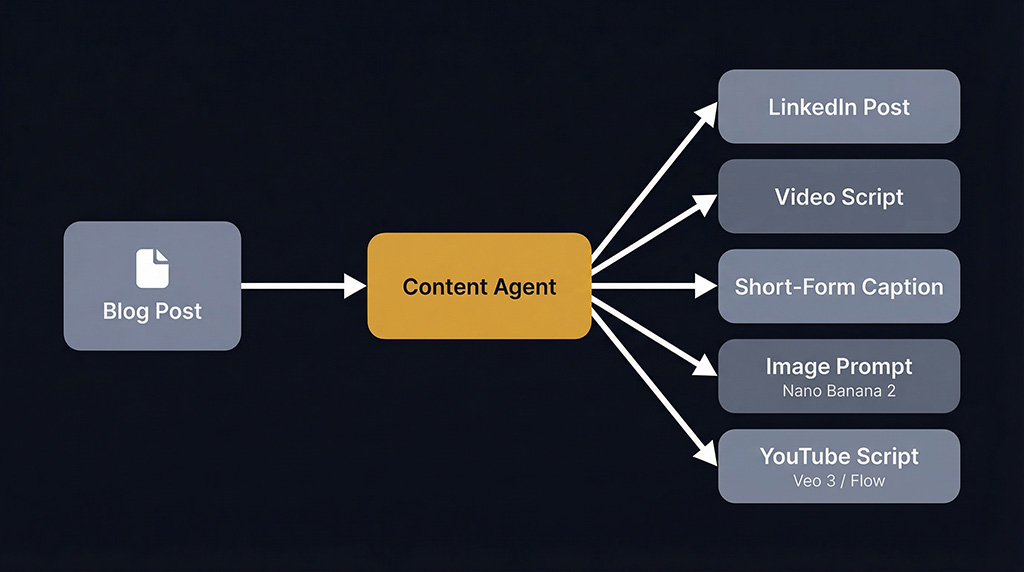
You write one solid blog post. The agent analyses it — not just what it says, but which angles will land on which platform — and produces platform-specific copy, video scripts, and image prompts calibrated for each format. It connects directly with Google’s AI video tools Veo 3 and Flow, Nano Banana 2 for image generation, and Claude for writing and strategy. One post becomes a week of content across multiple channels.
The principle is identical to the ads agents. One specific job. Prompts refined until the output is consistent. Custom knowledge about what actually performs on each platform, not generic content advice. No unnecessary steps.
Different task, same discipline.
The Objection You're Sitting With Right Now
You’re thinking: I’m not a tech person. I don’t know how to tell whether an AI agency is showing me something genuinely useful or just a good pitch.
Fair. Here’s how you actually tell.
Ask them to explain what each component does — not what it’s called, what it does. For your business. Specifically. If they need more than two sentences per step, the step probably shouldn’t exist.
Ask how many times they’ve revised their prompts. A prompt revised ten times looks fundamentally different from a first draft. It handles edge cases. It’s consistent. If they can’t give you a number, they haven’t done the work. They built version one and called it done.
Ask what it has caught that a human would have missed. Not hypothetically — specifically. A cap that was restricting instead of protecting. A campaign with the best approval rate being starved of budget. A trajectory problem flagged before the weekly report would have shown it. If they can’t point to a real example, the agent is a demo, not a tool.
Ask where it fails. Any system that’s been in real production has documented failure cases. If they tell you it works in every situation, they haven’t run it long enough to find out.
What You're Actually Paying For
When AI is built right for a small business, you’re not paying for complexity. You’re paying for someone to have already done the thinking.
The thinking about which specific job needs doing. The simplest configuration that does it reliably. The ten rounds of testing that made the prompts tight. The custom knowledge that makes the output relevant to your situation instead of generic.
That’s hard, slow work. It doesn’t fill a slide. But it’s what determines whether you get something that finds the setting holding your account back — or a demo that worked once in a boardroom.
The consultants with the elaborate flowcharts are selling you the slide. The ones worth working with are selling you the outcome, and the diagram, if they show you one at all, fits on a napkin.
Back to that deck with the diagram. The arrows, the nodes, the layers.
Here’s the reframe: the next time someone shows you something that complicated, don’t feel like you’re not sophisticated enough to understand it. Feel like you’ve just been given useful information.
The AI that actually helps your business probably looks almost boring from the outside. Specific. Quiet. Reliable.
It finds the setting that’s been holding your account back. It tells you before the month is over. You make the call. Volume nearly doubles.
That’s the whole point.
Your marketing, looked at properly
Thirty minutes on your current setup — what’s working, what’s quietly leaking budget, and what I’d fix first. You’ll leave with a clearer picture whether we work together or not.
Got something specific bugging you? Flag it when you book and I’ll have it looked at before we talk.

AboutBruce Marjoribanks
Bruce Marjoribanks has spent 27 years in marketing, including building, running and selling his own agency before going independent. He now runs every channel - paid, organic, social, email, creative and automation - as one integrated system, with AI ehancing production and the judgment staying human.