
The account had been managed for 18 months. The agency sent reports every month — tidy PDFs with green arrows, charts trending upward, and a bullet list of “optimizations performed this week.” Bid adjustments. Keyword additions. Budget reallocations. It looked like work.
Then the client hired me to take a second look.
The first thing I opened was the conversion tracking. It was counting page views as conversions. Every person who landed on the contact page — whether they filled out the form or not — registered as a lead. The green arrows in those reports? They were measuring traffic, not results. Eighteen months of decisions built on a number that meant nothing.
This isn’t a horror story. This is a Tuesday.
I’ve taken over Google Ads accounts from other agencies more times than I can count, and the pattern is so consistent it’s almost scripted. The reports look professional. The account underneath tells a different story entirely. And the gap between those two things is where your money disappears.
What "weekly optimization" actually looks like
Here’s what most agency account managers do each week: they log in, glance at the dashboard, adjust a few bids, maybe pause a keyword that’s obviously bleeding money, and log out. Then they note it in a task tracker so their manager sees activity.
That’s not optimization. That’s maintenance theater.
Real optimization means asking hard questions. Why is this campaign structured this way? Are we tracking the right things? Is the account architecture built for how Google’s AI works in 2025, or is it running a strategy from 2019? Those questions take time, and time is the one thing most agency account managers don’t have — not when they’re juggling 25 accounts and their performance is measured by how many “tasks completed” show up in the project management tool.
The result is accounts that look maintained but are fundamentally misconfigured. The weekly tweaks are real. The underlying problems nobody touches are also real. And the second category is where 80% of your wasted spend lives.
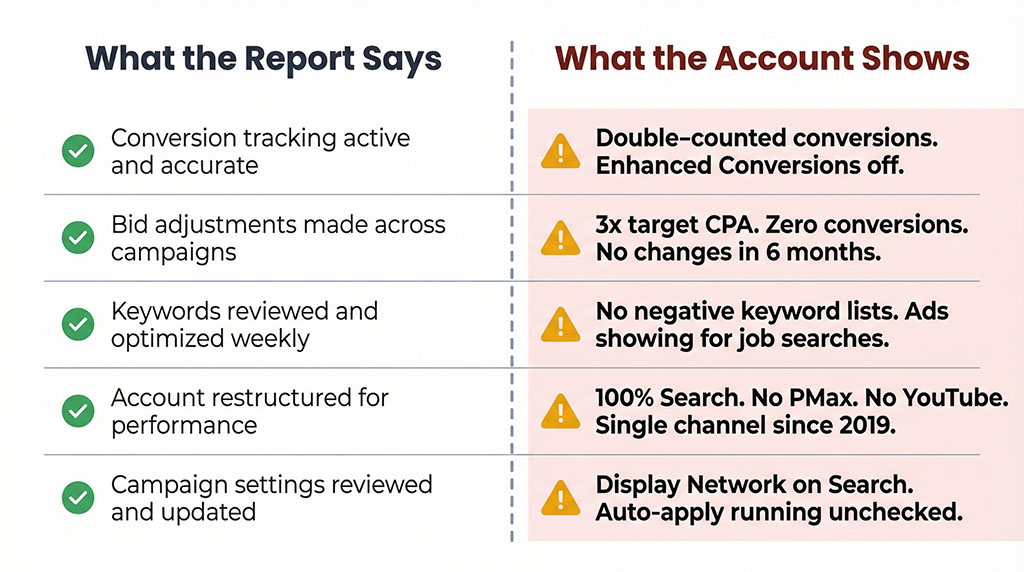
The five failures I find in almost every takeover
After enough account audits, you stop being surprised. The same cluster of problems appears whether the previous agency was a boutique shop or a large firm, whether the monthly spend was $3,000 or $30,000. The specifics vary. The pattern doesn’t.
Your conversion tracking is probably wrong
This is the foundation, and it’s broken more often than not. I routinely find accounts where Google Ads and GA4 are both counting conversions simultaneously — meaning every lead gets counted twice. The agency reports 40 leads this month. The real number is 20. Every decision made from that data is compromised.
But double-counting is the obvious problem. The subtler one is what they’re tracking. I’ve seen accounts where the conversion action is set to “page view” instead of “form submission.” Others where Enhanced Conversions — a feature Google has offered for years that dramatically improves tracking accuracy — was never turned on. The diagnostics page literally shows a status indicator. Nobody checked it.
Then there’s Consent Mode, which affects how well Google can model conversions from users who don’t accept cookies. Without it properly configured, you’re flying with partial data. The platform tells you this. There’s a diagnostic for it. In the accounts I take over, it’s almost never set up.
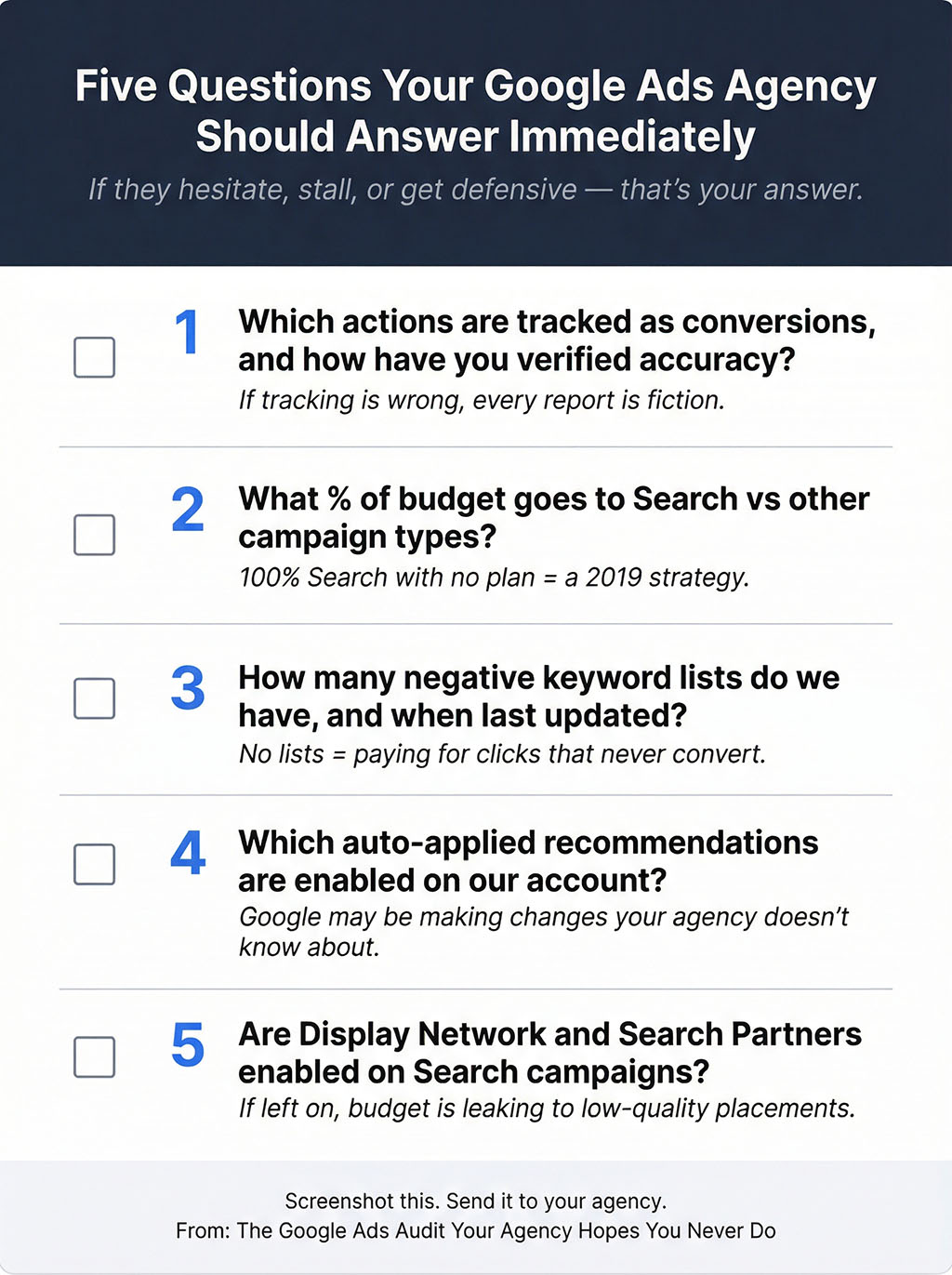
What to ask your agency: “Can you show me exactly which actions are being tracked as conversions, and walk me through how you’ve verified they’re accurate?” If they can’t answer in specific detail — what the conversion action is, whether Enhanced Conversions is active, what the diagnostic status shows — that’s your answer.
The entire account lives inside Search — and nothing else
Google Ads in 2025 is a full-funnel platform. Search campaigns catch people actively looking for what you sell. Performance Max uses AI to find customers across Search, Shopping, YouTube, Display, and Gmail simultaneously. Demand Gen targets people earlier in their decision process. YouTube builds awareness that feeds everything else downstream.
Most accounts I take over are running Search campaigns and nothing else. It’s as if someone built a fishing business but only ever casts a line from one spot on one dock.
The reason is simple: Search is what agencies have always known. Performance Max requires proper setup — tightly themed asset groups, 15-20 images, video assets, quality audience signals. Demand Gen requires creative assets and mid-funnel thinking. YouTube requires video production. All of this takes effort that “weekly optimization” doesn’t account for.
When I do find Performance Max campaigns in takeover accounts, they’re typically set up with default configurations. Generic audience signals. Auto-generated video instead of custom creative. No negative keywords applied (Google now allows up to 10,000 per campaign — a feature that launched in 2025). No brand exclusions configured. It’s the equivalent of buying a sports car and never taking it out of first gear.
What to ask your agency: “What percentage of our budget goes to Search versus other campaign types? And what’s the strategic rationale for that split?” If the answer is 100% Search with no plan for anything else, you’re paying for a 2019 strategy.
Nobody built negative keyword lists
This one costs you money every single day it goes unaddressed. When someone searches “Google Ads agency jobs” and your ad for Google Ads management services appears, you pay for that click. When someone searches your competitor’s name and your ad shows up, you pay for that click too.
The fix is negative keyword lists — organized exclusions that prevent your ads from showing on irrelevant searches. In a properly managed account, there are multiple lists: one for job-related searches, one for competitor names, one for informational queries that signal someone who’s researching but not buying, one for geographic terms outside your service area.
In takeover accounts, I typically find either no negative keyword lists at all, or a single disorganized list with a handful of terms that were added reactively after someone noticed wasted spend in a monthly report. Nobody sat down and systematically built the exclusion architecture. Nobody exports the search terms report quarterly and mines it for waste.
The irony is that this is one of the highest-impact, lowest-effort optimizations available. Exporting 90 days of search terms, identifying the irrelevant patterns, and building proper lists takes about two hours. Two hours, once, to stop a leak that’s been running for months.
What to ask your agency: “How many negative keyword lists do we have, and when were they last updated?” If the answer is vague, ask them to export the search terms report and walk you through it with you. The irrelevant searches will speak for themselves.
Auto-applied recommendations are running the account
Google offers “recommendations” inside every Ads account — suggestions to add keywords, change bidding strategies, create new ads. Helpful in theory. The problem is a feature called auto-apply, which lets Google implement these recommendations automatically unless someone actively turns them off.
In accounts I take over, auto-apply is almost always left on for high-risk changes. Google is automatically adding broad match keywords, creating responsive search ads, enabling Display Network expansion on Search campaigns — all without human review. The agency may not even know it’s happening, because these changes don’t show up in their workflow. They show up in the change history tab, quietly, while the account manager is busy making their own “optimizations” that get logged in the task tracker.
I disable auto-applied recommendations on Day 1 of every takeover. Not all of them — some low-risk ones are fine. But the ones that change your keyword strategy, your ad creative, or your campaign targeting? Those need human judgment. Letting Google auto-pilot those decisions is how you end up with an account that looks busy but isn’t being directed.
What to ask your agency: “Which auto-applied recommendations are currently enabled on our account?” If they don’t know off the top of their head, that tells you how closely they’re watching.
Display Network and Search Partners are quietly draining budget
This is the one that makes me shake my head every time, because it takes 30 seconds to fix.
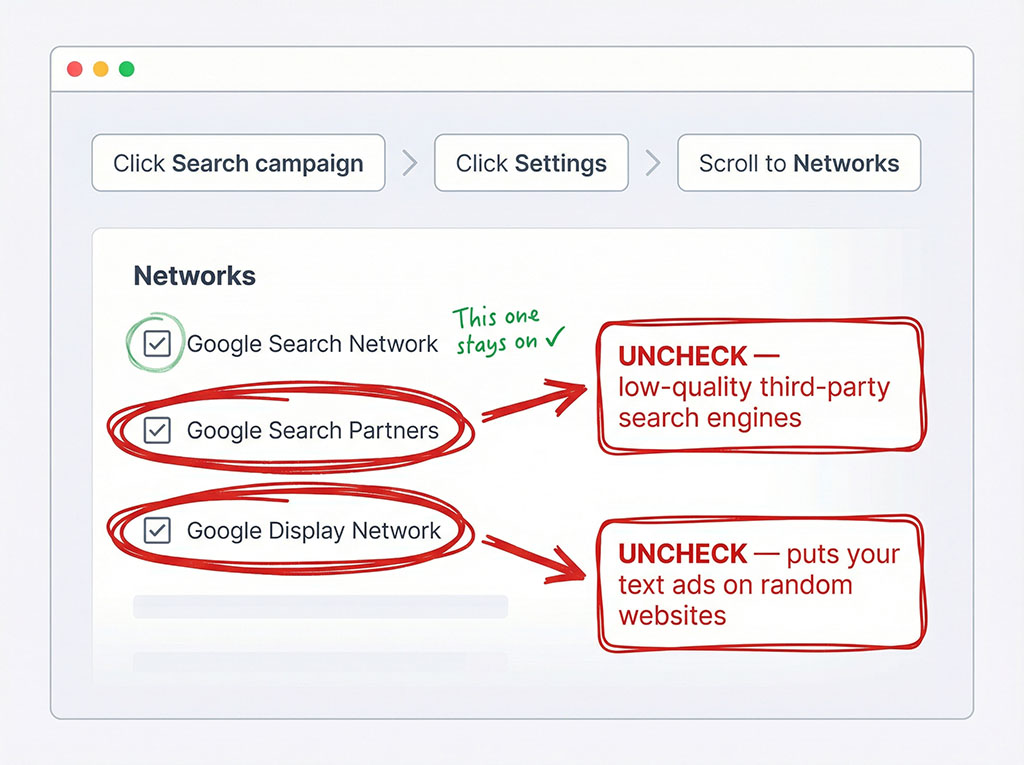
When you create a Google Search campaign, there are two checkboxes that default to “on”: Display Network and Search Partners. Display Network means your text ads — designed for people searching on Google — also appear on random websites across the internet. Search Partners means they appear on third-party search engines you’ve never heard of.
Both of these settings dilute your budget. They send impressions and clicks to placements where intent is lower, quality is worse, and conversion rates drop. In my testing across dozens of accounts, disabling both consistently improves Search campaign performance.
It takes 30 seconds per campaign. It’s a checkbox. And in the vast majority of accounts I take over, both are still enabled on every campaign, sometimes for years.
What to ask your agency: This one you can check yourself. Log into your Google Ads account, click on any Search campaign, go to Settings, and look for “Networks.” If Display Network or Search Partners are enabled, you’ve just found money on the floor.
"But you don't understand agency economics"
Here’s where I need to be fair, because not every agency account manager is lazy or incompetent. Most of them are overworked.
The standard agency model loads account managers with 20-30 clients each. Their days are a blur of reporting, client calls, and putting out fires. Performance is tracked by activity volume — tasks completed, recommendations implemented, reports delivered. Nobody’s measuring whether the foundational configuration is correct, because that kind of audit takes hours per account and doesn’t produce a neat line item on a weekly status update.
Add to that the rapid pace of Google Ads changes. Performance Max campaign-level negative keywords are new. AI Max for Search is new. Consent Mode V2 requirements evolved. Demand Gen campaigns launched. Broad match completely changed how it works with Smart Bidding. An account manager running a 2022 playbook isn’t being negligent — they’re being under-resourced and under-trained.
I get it. The economics of agency life make thorough account management genuinely difficult.
But the failures I’ve described aren’t time-intensive fixes. Disabling Display Network on Search campaigns takes 30 seconds. Setting up Enhanced Conversions takes 20 minutes. Building negative keyword lists takes two hours, once. Turning off dangerous auto-applied recommendations takes five minutes. These aren’t resource problems. They’re attention problems. They’re knowledge problems. And when you’re paying $2,000 or $5,000 or $15,000 a month in management fees, those problems are expensive.
The gap between reporting and reality
The hardest part of writing this is knowing that most business owners reading it will have no way to verify these things themselves. And that’s by design — not malicious design, but structural design. Agencies control the reporting. They choose which metrics to highlight. They frame the narrative.
A well-constructed monthly report can make almost any account look productive. Impressions are up — but because Display Network was enabled. Clicks increased — but on irrelevant search terms. Cost per conversion improved — but the conversion being measured is a page view, not an actual lead.
The numbers in the report might all be accurate. The story they tell can still be fiction.
This is why the five questions throughout this article matter. You don’t need to understand Google Ads at a technical level. You need to understand it well enough to ask questions that a properly managed account can answer in 30 seconds — and an improperly managed one can’t answer at all.
What that first account taught me about my own standards
That 18-month account — the one counting page views as conversions — is still a client of mine. It took 2 days to fix the foundation: real conversion tracking, proper campaign structure, negative keyword lists, Performance Max built correctly, auto-applied recommendations disabled. The kind of work that should have been done on day one.
Within 30 days, actual leads — real form submissions from real prospects — had increased by the kind of margin that makes you wonder where all that previous ad spend went. Not because I’m a genius. Because the infrastructure was finally telling the truth, and decisions built on truth tend to work better than decisions built on page views dressed up as conversions.
Every account I take over now starts the same way. I open the conversion tracking first. And every time — every single time — I find something that makes the previous reports unreliable.
Those green arrows in the tidy PDF? They were measuring traffic. Not results. The numbers were accurate. The story they told was fiction.
Now you know the questions to ask so the next report you read tells you which one you’re looking at.
See what 18 months of “weekly optimizations” left behind
A 15-minute call to walk through your account and check the five things this article covers — no pitch, no pressure, just what the data shows.
Every account I open tells a different story than the reports. Yours probably does too.
You don’t need to take my word for it. You need to see it yourself.